


 Perpignan–Rivesaltes Airport, ICAO: LFMP is a small regional airport located approximately 5kms north of Perpignan, close to the Spanish border in southwestern France. A very picturesque area, it is on the eastern end of the Pyrenees Mountains and on the Mediterranean coast. The airport also goes by the name of Llabanère Airport. The airport has two runways; 15/33 @ 8,202ft and 13/31 @ 4,150ft.
I was not able to find very much in the way of other information about its history. The developers write in the product manual that the airport can trace its history back to early Aeropostale days, with famous French aviators transiting there before their flights continued on towards North Africa.
The product is compatible with FSX only.
Installation
Installing the package was very simple. After the process starts, your web browser will open and you’ll need to enter your email address and the registration key provided at the time of purchase. This will generate an authorization code that you’ll want to hang on to, as you will need to enter it in the next screen and for any subsequent re-installations of the addon. The installation will then continue showing the name of the start menu program group. When completed you can go there to access the manual and program uninstaller. Each is provided in both English and French.
Configuration
There are no configuration options for this addon.
Documentation
The product comes with an eight page pdf product manual. In it they include brief explanations on the following topics: scenery description, installation, scenery properties, performance, GSX© compatibility, airport charts, F.A.Q, acknowledgements, E.U.L.A. and Forum and technical support. If you are looking for more than a cursory explanation you’ll be disappointed.
Scenery
The scenery covers the airport plus some limited coverage outside of its borders.
Here is comparison between the FSX default version of LFMP and the one created by Dreamflight.


Ground Textures
Hi resolution photo images are used throughout for the ground textures. The airport happens to be located in a rural setting so the coverage area outside of the airport consists mostly of cultivated fields along with some populated areas and a few major roadways that border it. This landscape shows off the quality of the photo imagery with details that remain clear even when viewed at very low latitudes.

 Grassy areas of the airport have also been augmented with the addition of volumetric grasses.
As good as the textures are I did see an area where I felt that the photo textures should have been modified to improve their appearance. This was on the arrivals side of the main terminal building. There is a very dark patch, likely caused by the building’s shadow. It lacks any ground detail, causing a few problems; the building doesn’t have any texture details to line up with, plus there are several vehicles that are parked here and they look out of place. Looking at satellite images you see that there should be a road with a turnabout plus a small connecting road to the nearby parking lot. Not much of a problem when in the cockpit of your aircraft parked on the apron however when viewed from above it is somewhat significant.
 The airport’s hard surface areas – aprons, taxiways and runways – have been recreated with hi-resolution graphic textures and the results are very good. Painted markings are crisp and clear, weathering details are visible in the asphalt surface and there are also some signs of dirt at the aircraft parking spots.
 My only concern here was that in some spots where the photo images and graphic textures merged they looked disjointed and didn’t blend naturally.
 Buildings
Not being very large there are a limited number of buildings at Perpignan–Rivesaltes Airport. There is the main terminal, control tower, fire station and fuel storage tanks clustered together between runways 15/33 and 13/31. There is another group of structures, mostly hangars, found on the south side of runway 31.
Main terminal cluster
 South side of runway 31
 Overall I was impressed with the work they did in recreating them. It was evident that they made an effort to make them look realistic. This was accomplished in a number of ways, with high quality textures playing a major role as they clearly displayed ageing, weathering and some fine details. We are also able to differentiate between various types of building materials. To further enhance the quality they included extra detailing visible both on the walls and the roof tops. Colouring and shading, also very important, played a part in giving the structures a 3 dimensional look.
The terminal building, which happens to be the most complex of all the airport structures, is also the best example to show off their work. Each of the attributes I stated earlier are clearly visible as you look through the screenshots. To point out some of the highlights; there is the wire mesh safety fence that has been modelled and can be seen on the building’s second floor. There is also the metal railing and staircase on the roof top. Textures show discolouration and cracking on some of the concrete surfaces. On the ground level the baggage conveyor belts have been included along with the electrical control boxes. These are all nice visual enhancements that add character and interest to the structure.


 Other buildings in the area also included many of the same visual enhancements as seen with the main terminal. The fire station has 3 dimensional vehicle bays with the fire trucks clearly visible partially parked inside. This is much more realistic than having a simple flat image as I’ve often seen in other addons.
The fuel storage area also shows off some of their fine work. The metal safety railing and the detailed pipes plus concrete like textures are all worth noting.
These are just a few examples of the quality found throughout the product.


 The other collection of buildings located on the south side of runway 31 have also been recreated using the same techniques with the same realistic results.


 In addition to external modelling they took things a step further with several of the large hangars. They were depicted with their large bay doors open and their interiors detailed. This allows us to both admire and to utilize these hangars for what they are, a place to park your aircraft. I thought that this was a nice feature that opened up the possibility of more interaction with the airport if you so desired.


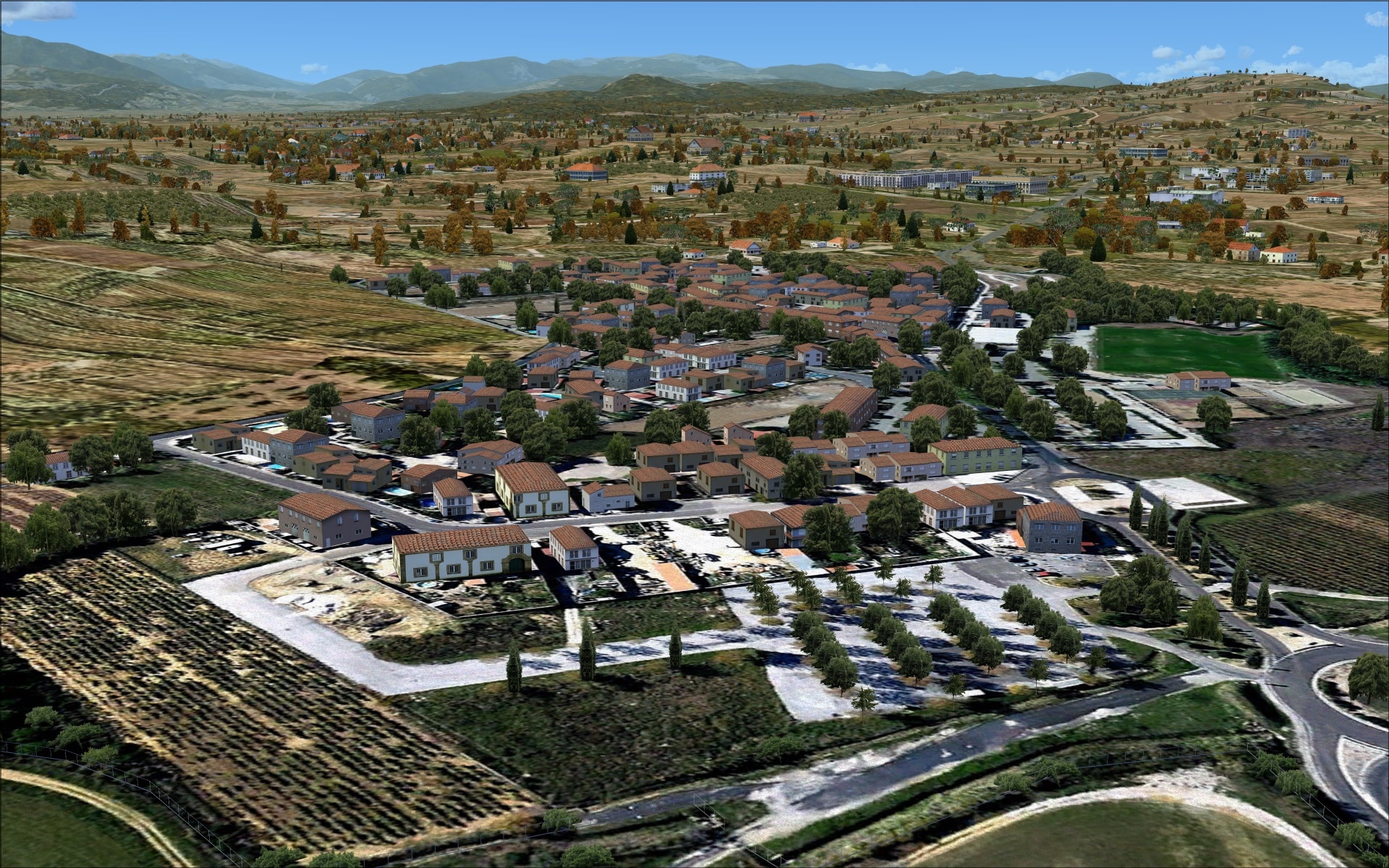
Included as part of the scenery coverage area is the adjacent commune of Peyrestortes located just north of the airport. It consists mostly of single storey residential units. These have been modelled using generic structures on a photo image base. This adds a little something to the immersion factor when inbound to runway 15.

 Objects/vehicles
The airport contained the typical mix of objects/vehicles found at an airport of this size. Placement was also well thought out as these objects/vehicles were located in areas where you’d expect to normally find them to support daily airport operations. Nothing stood out as being inappropriate or extraordinary, just good solid work.
With regards to their quality, the models were detailed and looked good even when viewed close up.


 I rely on Ultimate traffic 2 to inject AI aircraft traffic into my FSX airports. On occasion where there is limited traffic such as is the case at this airport the developers needed to give the scenery a visual boost or the airport would look deserted. I was very happy to see that they had dealt with that scenario and included some static aircraft. I have seen where the addition of static aircraft at an airport can detract from the product’s appeal. This is usually the case when developers use low resolution models that look outdated and out of place. At LFMP that certainly wasn’t the case. The aircraft types were varied and realistic ranging from small single engine aircraft to a Boeing 757; all were detailed and suited the airport quite well matching the rest of product’s high quality. They definitely enhanced the scenery especially in the GA and civilian aviation areas. My only criticism is that I wish that they had included at least one aircraft parked near to the terminal.


 Animations
The only visible animation was moving vehicular traffic. Cars and trucks could be seen moving along nearby roadways as well as the short road that goes to the terminal building’s entrance. Unfortunately there were a few problems with the traffic. The major issue was that vehicles appeared to be following the default FSX road system and not the roads in the photo imagery.

 The other less obvious problem had to do with the vehicles that were driving around the terminal entrance loop. Here it wasn’t so much where they were driving but the excessive speed; it was like they were in a formula 1 race.
Night
I was generally happy with how LFMP was portrayed at night with no major problems. Like other aspects of the scenery the overall effect and ambiance was good. Ground and marker lighting was very good. Not too bright but visible as distinct points of light. Building lighting was also pretty good, they had some windows lit up while others remained dark. Apron lighting was also well done; I especially liked how the overhead apron lighting had that globe effect at the light source. This helps accentuate the high intensity lighting.


 Technical Support
I rarely comment on technical support, however in this case I am going to and that’s because I had to use their services. The problem I have is this; when I try and load the airport, FSX crashes. After some investigating on my part I discovered that I could load LFMP if I disabled a specific scenery file, LFMP_taxilights.bgl. This quick workaround allowed me to load the airport but without the taxiway light fixtures.
I then contacted the developer’s technical support via email. They quickly responded and set out to help me. After a flurry of email exchanges with numerous suggestions and replacement files the end result was that nothing worked to rectify my problem. They did tell me that several other users did report a similar problem but they were able to provide fixes. They continue to investigate with the goal of coming up with a solution.
I was pleased with their efforts and the level of support they provided to me.
I’d also like to state that another member of the simFlight reviewing team was provided with the same download files and had no problems with installing or using the airport.
Final Thoughts
Not including my specific issue I did find a few problems with the scenery however I consider them to be minor and wouldn’t deter me from purchasing the product. The product is good value for the money and I’d place it as mid-range if you were to compare it to some of the other well-known scenery developers. It is nicely detailed and ideally suited for smaller commercial aircraft such as the Bombardier Q400. The Mediterranean coastline will definitely benefit from this recent release and so will you if you enjoy flying in this picturesque part of the world. I look forward to their next airport.
My Ratings
Installer: Very good. No fuss installer however you’ll need an active internet connection to get your authorization code.
Documentation: Good. Easy to read but only provides a minimal amount of information.
Modelling: Very good.
Extras: None really.
Download Size: FSX 161MB
Price: EUR 16.76 without VAT
Forum/FAQ page: http://www.iflysimx.com/forum/108-support/
Link: http://secure.simmarket.com/dreamflight-studios-perpignan-rivesaltes-airport-lfmp-fsx.phtml
Test System:
Intel i7 960 OC @ 4.2 Ghz, 6 Gb RAM, Gigabyte GTX780 w3Gb video, Win 7 Ultimate 64, FSX w/acceleration, DX9, UT2, REX Overdrive, GEXn, UTX, AES, GSX, FSUIPC.
Richard Desjardins


0 Responses
Had also problems with CTD. In my case JDS_staticGA_lib.bgl was responsible file.
Moved out of scenery folder and now it works perfect.
Have fun!