

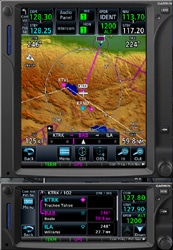
Flight1 Software have announced an update to their popular Garmin GTN avionics packages for FSX and P3D.
Both the GTN-650 and -750 now support the new PC Trainer V5, including a worldwide database, plus other significant changes like the use of all CPU cores, world database update, and display of geo-referenced charts behind the approach screen. Click “Read More” for the full Press Release.
Flight1 GTN Series Update
Flight1 is proud to announce a new update for its GTN series products. This new version includes many new and exciting features.
GTN V5 PC Trainer Support
Geo-referenced charts: if an approach is loaded and the chart option is selected, its chart is automatically loaded and displayed behind the map. Also, the geo-referenced airplane is displayed on the chart page.
Updated databases: full worldwide terrain, no need to buy the DVD anymore, updated navigation database: 1405, SafeTaxi, basemap, charts
WAAS approaches outside of USA, depending on availability. There are some in Europe, We suggest checking the official European EGNOS website for compatible airports, there are a few compared to the US.
ADS-B traffic with directional target information, this replaces the old TIS and provides a different angle in traffic awareness and avoidance
Utilities/scheduler: ability the schedule custom messages
Ability to change fuel units to metric
The GTN will now uses all CPU cores, this provides a smoother overall experience with multiple units.
The CPU Core option is no longer available.
P3D 2.5 hotfix 3 support.
Before installing the latest Flight1 GTN, users must uninstall the GTN PC Trainer V2, then redownload and reinstall the Flight1 GTN from the Flight1 sales page. Follow the installer’s instructions on downloading and installing the GTN PC Trainer V5.
The FSX versions of the GTN avionics can be found here, the P3D versions here.


0 Responses
I will buy immediately as soon, as the navigation database is updateable for an acceptable pricing condition.
Because it sits atop the Garmin trainer, then the navdata is that of the real world device. Therefore, the cost of that database will always be the same as for the real world device. It’s a limitation of getting the realism level that comes from using the trainer.